| Mathematics | |
Column-Oriented Data Sets
Univariate statistical data is typically stored in individual vectors. The vectors can be either 1-by-n or n-by-1. For multivariate data, a matrix is the natural representation but there are, in principle, two possibilities for orientation. By MATLAB convention, however, the different variables are put into columns, allowing observations to vary down through the rows. Therefore, a data set consisting of twenty four samples of three variables is stored in a matrix of size 24-by-3.
Vehicle Traffic Sample Data Set
Consider a sample data set comprising vehicle traffic count observations at three locations over a 24-hour period.
Loading and Plotting the Data
The raw data is stored in the file, count.dat.
    11    11     9
     7    13    11
    14    17    20
    11    13     9
    43    51    69
    38    46    76
    61   132   186
    75   135   180
    38    88   115
    28    36    55
    12    12    14
    18    27    30
    18    19    29
    17    15    18
    19    36    48
    32    47    10
    42    65    92
    57    66   151
    44    55    90
   114   145   257
    35    58    68
    11    12    15
    13     9    15
    10     9     7
Use the load command to import the data.
load count.dat
This creates a matrix count in the workspace.
For this example, there are 24 observations of three variables. This is confirmed by
[n,p] = size(count)
n =
    24
p =
     3
Create a time vector, t, of integers from 1 to n.
t = 1:n;
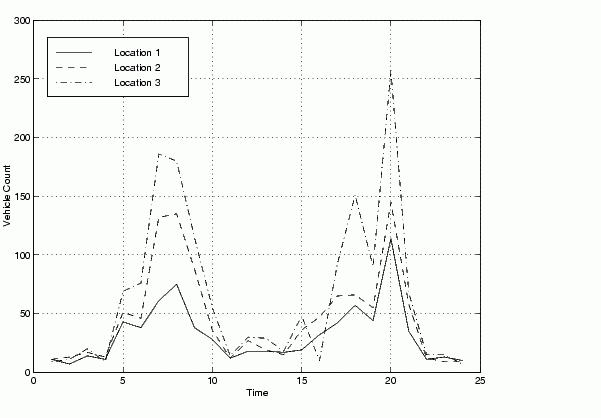
Now plot the counts versus time and annotate the plot.
set(0,'defaultaxeslinestyleorder','-|--|-.')
set(0,'defaultaxescolororder',[0 0 0])
plot(t,count), legend('Location 1','Location 2','Location 3',0)
xlabel('Time'), ylabel('Vehicle Count'), grid on
The plot shows the vehicle counts at three locations over a 24-hour period.
| | Data Analysis and Statistics | Basic Data Analysis Functions | |