| External Interfaces/API | |
Calling Functions from Fortran MEX-Files
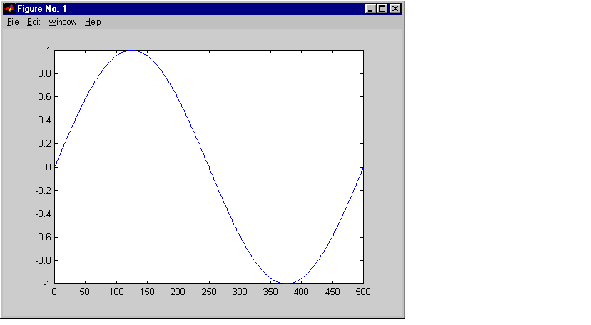
It's possible to call MATLAB functions, operators, M-files, and even other MEX-files from within your Fortran source code by using the API function mexCallMATLAB. This example creates an mxArray, passes various pointers to a subfunction to acquire data, and calls mexCallMATLAB to calculate the sine function and plot the results.
C     $ Revision: 1.8 $
C
================================================================
C
C     sincall.f
C
C     Example for illustrating how to use mexCallMATLAB.
C
C     Creates an mxArray and passes its associated pointers (in
C     this demo, only pointer to its real part, pointer to number
C     of rows, pointer to number of columns) to subfunction fill()
C     to get data filled up, then calls mexCallMATLAB to calculate
C     sin function and plot the result.
C
C     NOTE: The subfunction fill() is in the file called fill.f.
C
C     This is a MEX-file for MATLAB.
C     Copyright (c) 1984-2000 The MathWorks, Inc.
C
C ==============================================================

C     Gateway subroutine

      subroutine mexFunction(nlhs, plhs, nrhs, prhs)
      integer nlhs, nrhs
C---------------------------------------------------------------
C     (pointer) Replace integer by integer*8 on the DEC Alpha
C     platform.
C
      integer plhs(*), prhs(*)
      integer rhs(1), lhs(1)
      integer mxGetPr, mxCreateFull
C---------------------------------------------------------------
C
      integer m, n, max

C     initializition
      m=1
      n=1
      max=1000

      rhs(1) = mxCreateFull(max, 1, 0)

C     Pass the pointer and variable and let fill() fill up data.
      call fill(%val(mxGetPr(rhs(1))), m, n, max)
      call mxSetM(rhs(1), m)
      call mxSetN(rhs(1), n)

      call mexCallMATLAB(1, lhs, 1, rhs, 'sin')
      call mexCallMATLAB(0, NULL, 1, lhs, 'plot')

C     Clean up the unfreed memory after calling mexCallMATLAB.
      call mxFreeMatrix(rhs(1))
      call mxFreeMatrix(lhs(1))

      return
      end
C     $ Revision: 1.3 $
C
================================================================
C
C     fill.f
C     This is the subfunction called by sincall that fills the
C     mxArray with data. Your version of fill can load your data
C     however you would like.
C
C     This is a MEX-file for MATLAB.
C     Copyright (c) 1984-2000 The MathWorks, Inc.
C
C
================================================================
C     Subroutine for filling up data.

      subroutine fill(pr, m, n, max)

      real*8  pr(*)
      integer i, m, n, max

      m=max/2
      n=1
      do 10 i=1,m
 10      pr(i)=i*(4*3.1415926/max)

      return
      end
It is possible to use mexCallMATLAB (or any other API routine) from within your computational Fortran subroutine. Note that you can only call most MATLAB functions with double-precision data. M-functions that perform computations, like eig, will not work correctly with data that is not double precision.
sincall
Note
It is possible to generate an object of type mxUNKNOWN_CLASS using mexCallMATLAB. See the example below.
|
The following example creates an M-file that returns two variables but only assigns one of them a value. function [a,b]=foo[c] a=2*c;
MATLAB displays the following warning message.
Warning: One or more output arguments not assigned during call
    to 'foo'.
If you then call foo using mexCallMATLAB, the unassigned output variable will now be of type mxUNKNOWN_CLASS.
| | Handling Sparse Matrices | Advanced Topics | |