

| External Interfaces/API | |
Using MATLAB As a Client
For MATLAB to act as a client application, you can use the MATLAB DDE client functions to establish and maintain conversations.
This figure illustrates how MATLAB communicates as a client to a server application.
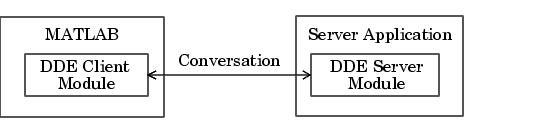
MATLAB's DDE client module includes a set of functions. This table describes the functions that enable you to use MATLAB as a client.
| Function |
Description |
ddeadv |
Sets up advisory link between MATLAB and DDE server application. |
ddeexec |
Sends execution string to DDE server application. |
ddeinit |
Initiates DDE conversation between MATLAB and another application. |
ddepoke |
Sends data from MATLAB to DDE server application. |
ddereq |
Requests data from DDE server application. |
ddeterm |
Terminates DDE conversation between MATLAB and server application. |
ddeunadv |
Releases advisory link between MATLAB and DDE server application. |
If the server application is Microsoft Excel, you can specify the System topic or a topic that is a filename. If you specify the latter, the filename ends in .XLS or .XLC and includes the full path if necessary. A Microsoft Excel item is a cell reference, which can be an individual cell or a range of cells.
Microsoft Word for Windows topics are System and document names that are stored in files whose names end in .DOC or .DOT. A Word for Windows item is any bookmark in the document specified by the topic.
The following example is an M-file that establishes a DDE conversation with Microsoft Excel, and then passes a 20-by-20 matrix of data to Excel.
% Initialize conversation with Excel.
chan = ddeinit('excel', 'Sheet1');

% Create a surface of peaks plot.
h = surf(peaks(20));
% Get the z data of the surface
z = get(h, 'zdata');

% Set range of cells in Excel for poking.
range = 'r1c1:r20c20';

% Poke the z data to the Excel spread sheet.
rc = ddepoke(chan, range, z);
| | Example: Using Visual Basic and the MATLAB DDE Server | DDE Advisory Links | |