| MATLAB Function Reference | |
Easy to use 3-D parametric curve plotter
Syntax
ezplot3(x,y,z)
ezplot3(x,y,z,[tmin,tmax])
ezplot3(...,'animate')
Description
ezplot3(x,y,z) plots the spatial curve x = x(t), y = y(t), and z = z(t) over the default domain 0 < t < 2 .
.
ezplot3(x,y,z,[tmin,tmax]) plots the curve x = x(t), y = y(t), and z = z(t) over the domain tmin < t < tmax.
ezplot3(...,'animate') produces an animated trace of the spatial curve.
Remarks
Array multiplication, division, and exponentiation are always implied in the expression you pass to ezplot3. For example, the MATLAB syntax for a plot of the expression,
x = s./2, y = 2.*s, z = s.^2;
which represents a parametric function, is written as:
ezplot3('s/2','2*s','s^2')
That is, s/2 is interpreted as s./2 in the string you pass to ezplot3.
Examples
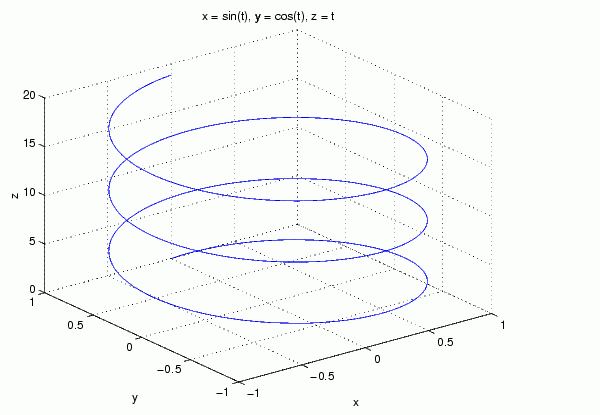
This example plots the parametric curve,

ezplot3('sin(t)','cos(t)','t',[0,6*pi])
See Also
ezcontour, ezcontourf, ezmesh, ezmeshc, ezplot, ezpolar, ezsurf, ezsurfc, plot3
| | ezplot | ezpolar | |