| MATLAB Function Reference | |
Syntax
scatter(X,Y,S,C)
scatter(X,Y)
scatter(X,Y,S)
scatter(...,markertype)
scatter(...,'filled')
h = scatter(...,)
Description
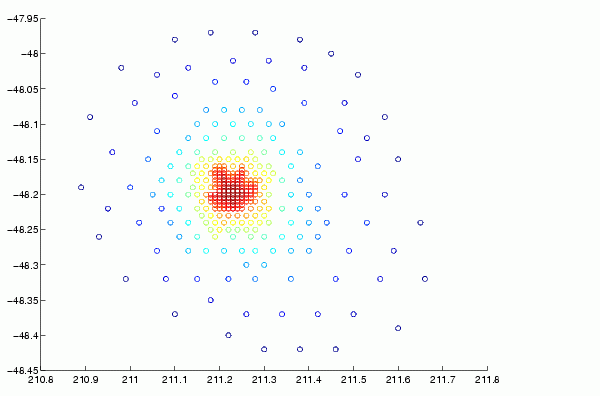
scatter(X,Y,S,C) displays colored circles at the locations specified by the vectors X and Y (which must be the same size).
S determines the area of each marker (specified in points^2). S can be a vector the same length as X and Y or a scalar. If S is a scalar, MATLAB draws all the markers the same size.
C determines the colors of each marker. When C is a vector the same length as X and Y, the values in C are linearly mapped to the colors in the current colormap. When C is a length(X)-by-3 matrix, it specifies the colors of the markers as RGB values. C can also be a color string (see ColorSpec for a list of color string specifiers)
scatter(X,Y) draws the markers in the default size and color.
scatter(X,Y,S) draws the markers at the specified sizes (S) with a single color.
scatter(...,markertype) uses the marker type specified instead of 'o' (see LineSpec for a list of marker specifiers).
scatter(...,'filled') fills the markers.
h = scatter(...) returns the handles to the line objects created by scatter (see line for a list of properties you can specify using the object handles and set).
Remarks
Use plot for single color, single marker size scatter plots.
Examples
load seamount
scatter(x,y,5,z)
See Also
| | save (serial) | scatter3 | |