| MATLAB Compiler | |
Controlling Comments in Output Code
Use the annotation:type option to include your initial M-file comments and code in your generated C or C++ output. The possible values for type are:
Not specifying any annotation type uses the default of all, which includes the complete source of the M-file (comments and code) interleaved with the generated C/C++ source.
The following sections show segments of the generated code from this simple Hello, World example.
function hello
% This is the hello, world function written in M code
        fprintf(1,'Hello, World\n' );
Comments Annotation
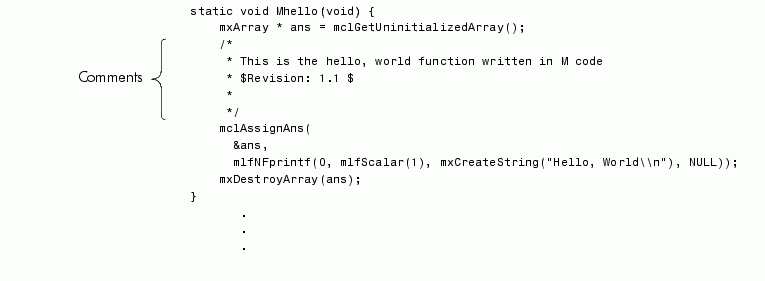
To include only comments from the source M-file in the generated output, use
mcc -A annotation:comments ...
This code snippet shows the generated code containing only the comments.
All Annotation
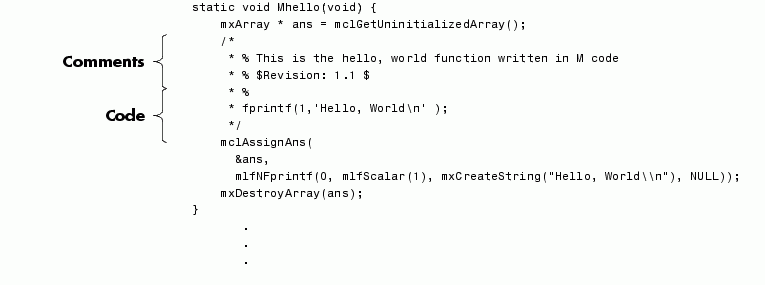
To include both comments and source code from the source M-file in the generated output, use
mcc -A annotation:all ...
or do not stipulate the annotation option, thus using the default of all.
The code snippet contains both comments and source code.
No Annotation
To include no source from the initial M-file in the generated output, use
mcc -A annotation:none ...
This code snippet shows the generated code without comments and source code.
static void Mhello(void) {
    mxArray * ans = mclGetUninitializedArray();
    mclAssignAns(
      &ans,
      mlfNFprintf(0, mlfScalar(1), mxCreateString("Hello, World\\n"), NULL));
    mxDestroyArray(ans);
}
       .
       .
       .
| | Including M-File Information in Compiler Output | Controlling #line Directives in Output Code | |