

| Creating and Manipulating Models | |
Additional Insight into LTI Properties
By reading this section, you can learn more about using the Ts, InputName, OutputName, InputGroup, and OutputGroup LTI properties through a set of examples. For basic information on Notes and Userdata, see Generic Properties. For detailed information on the use of InputDelay, OutputDelay, and ioDelay, see Time Delays.
Sample Time
The sample time property Ts is used to specify the sampling period (in seconds) for either discrete-time or discretized continuous-time LTI models. Suppose you want to specify
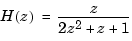
as a discrete-time transfer function model with a sampling period of 0.5 seconds. To do this, type
h = tf([1 0],[2 1 1],0.5);
This sets the Ts property to the value 0.5, as is confirmed by
h.Ts
ans =
    0.5000
For continuous-time models, the sample time property Ts is 0 by convention. For example, type
h = tf(1,[1 0]);
get(h,'Ts')
ans =
     0
To leave the sample time of a discrete-time LTI model unspecified, set Ts to  . For example,
h = tf(1,[1 -1],-1)
Transfer function:
  1
-----
z - 1

Sampling time: unspecified
The same result is obtained by using the Variable property.
h = tf(1,[1 -1],'var','z')
In operations that combine several discrete-time models, all specified sample times must be identical, and the resulting discrete-time model inherits this common sample time. The sample time of the resultant model is unspecified if all operands have unspecified sample times. With this inheritance rule for Ts, the following two models are equivalent.
tf(0.1,[1 -1],0.1) + tf(1,[1 0.5],-1)
tf(0.1,[1 -1],0.1) + tf(1,[1 0.5],0.1)
tf(0.1,[1 -1],0.1) + tf(1,[1 0.5],0.5)
??? Error using ==> lti/plus
In SYS1+SYS2, both models must have the same sample time.
Use d2d to change the sample time of a discrete-time system and resample it.
Input Names and Output Names
You can use the InputName and OutputName properties (in short, I/O names) to assign names to any or all of the input and output channels in your LTI model.
For example, you can create a SISO model with input thrust, output velocity, and transfer function  by typing
h = tf(1,[1 10]);
set(h,'inputname','thrust','outputname','velocity',...
                                'variable','p')
Equivalently, you can set these properties directly by typing
h = tf(1,[1 10],'inputname','thrust',...
                   'outputname','velocity',...
                   'variable','p')
Transfer function from input "thrust" to output "velocity":
  1
------
p + 10
Note how the display reflects the input and output names and the variable selection.
In the MIMO case, use cell vectors of strings to specify input or output channel names. For example, type
num = {3 , [1 2]};
den = {[1 10] , [1 0]};
H = tf(num,den);         % H(s) has one output and two inputs

set(H,'inputname',{'temperature' ; 'pressure'})
The specified input names appear in the display of H.
Transfer function from input "temperature" to output:
  3
------
s + 10

Transfer function from input "pressure" to output:
s + 2
-----
  s
To leave certain names undefined, use the empty string '' as in
H = tf(num,den,'inputname',{ 'temperature' ; '' })
Input Groups and Output Groups
In many applications, you may want to create several (distinct or intersecting) groups of input or output channels and name these groups. For example, you may want to label one set of input channels as noise and another set as controls.
To see how input and output groups (I/O groups) work:
controls, the first output to a group named temperature, and the last two outputs to a group named measurements.
h = rss(1,3,3);
set(h, 'InputGroup',{[1 2] 'controls'})
set(h, 'OutputGroup', {[1] 'temperature'; [2 3] 'measurements'})
h
and MATLAB returns a state-space model of the following form.
a =
                        x1
           x1     -0.64884


b =
                        u1           u2           u3
           x1      0.12533            0            0


c =
                        x1
           y1       1.1909
           y2       1.1892
           y3            0


d =
                        u1           u2           u3
           y1      0.32729            0       -0.1364
           y2            0            0            0
           y3            0       2.1832            0

I/O Groups:
   Group Name     I/O    Channel(s)
    controls       I        1,2
  temperature      O         1
  measurements     O        2,3

Continuous-time model.
Notice that the middle column of the I/O group listing indicates whether the group is an input group (I) or an output group (O).
In general, to specify M input groups (or output groups), you need an M-by-2 cell array organized as follows.
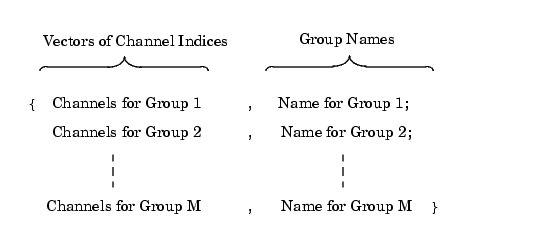
Figure 1-2: Two Column Cell Array
When you specify the cell array for input (or output) groups, keep in mind:
'') to the group names.h.InputGroup = [h.InputGroup; {[3] 'disturbance'}];
adds another input group called disturbance to h.
You can use regular cell array syntax for accessing or modifying I/O group components. For example, to delete the first output group, temperature, type
h.OutputGroup(1,:) = []
ans =
    [1x2 double]    'measurements'
Similarly, you can add or delete channels from an existing input or output group. Recalling that input group channels are stored in the first column of the corresponding cell array, to add channel three to the input group controls, type
h.inputgroup{1,1} = [h.inputgroup{1,1} 3]
h.inputgroup{1,1} = [1 2 3]
| | Direct Property Referencing | Model Conversion | |