
| Database Toolbox | |
Use preferences to specify how you want queries to handle NULL data.
The Preferences dialog box appears showing the current values for handling NULL values. The default value for strings is null and for numbers is NaN.
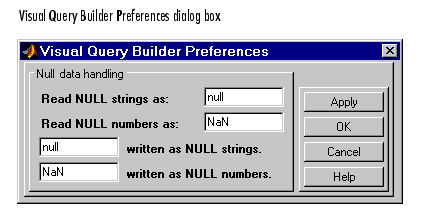
NaN to 0 if you want any NULL number from the database to be imported as a 0 rather than as a NaN (the default).Specify preferences for writing NULL values if you use the Database Toolbox functions to export data from MATLAB to your databases.
If you clicked OK, the Preferences dialog box closes. If you clicked Apply, the Preference dialog box remains open, but the preferences are in effect.
Query results reflect your preferences for handling NULL values. For example, if you specified that NULL numbers should be read as 0's instead of NaNs, then the results will show 0's where previously there had been NaNs.
Preferences apply to the current MATLAB session. They are not saved with a query.
Another way to set preferences is using the setdbprefs command. To use the preferences whenever you run MATLAB, include the setdbprefs command in your startup file.
See Also
| Save Queries |