| Database Toolbox | |
Exporting Data from MATLAB to a New Record in a Database
In this part of the tutorial, you retrieve a set of data, perform a simple calculation on the data using MATLAB, and export the results as a new record to another table in the database. Specifically, you retrieve freight costs from an orders table, calculate the average freight cost, put the data into a cell array to export it, and then export the data (the average freight value and the number of shipments on which the average was based) to an empty table.
You use these Database Toolbox functions:
If you want to see or copy the functions for this part of the tutorial, or if you want to run the set of functions, use the M-file matlab\toolbox\database\dbdemos\dbinsertdemo.m.
Northwind database to be sure it is writable,
that is, not read-only.
Northwind database in Microsoft Access.
Avg_Freight_Cost that has two columns,
Calc_Date and Avg_Cost.
Calc_Date field, use the default Data Type, which is Text, and
for the Avg_Cost field, set the Data Type to Number.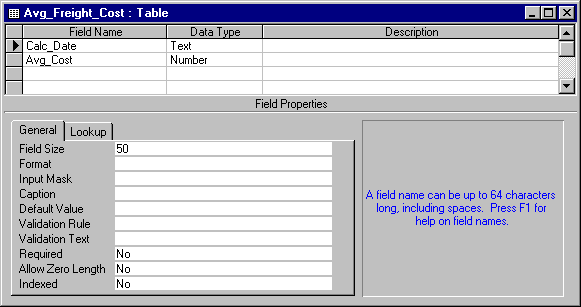
If you need more information about how to create a table in Access, see Microsoft Access help or written documentation.
SampleDB. Typeconn = database('SampleDB', '', '');
freight column of data from the orders table. To keep the example simple, import only three rows of data. Typecurs = exec(conn, 'select freight from orders'); curs = fetch(curs, 3);
AA = curs.Data
numrows to the number of rows in the array. Then convert the cell array AA to a vector and calculate the average, assigning the result to the variable meanA. Divide the sum by numrows, but note that you must convert numrows to a double precision value because the divide operator, /, requires it. Typenumrows = rows(curs);
meanA = sum([AA{:}])/double(numrows)
D to the date on which these orders were shipped - typeD = '1/20/98';
exdata(1,1) = {D}
    exdata =
        '1/20/98'
Put the mean in the second cell by typing
exdata(1,2) = {meanA}
    exdata =
    '1/20/98'    [25.2600]
Avg_Freight_Cost table you created earlier, Calc_Date and Avg_Cost. Assign the variable colnames to the cell array containing the column names. Typecolnames = {'Calc_Date','Avg_Cost'};
AutoCommit flag for the database. The status of the AutoCommit flag determines if the database data will be automatically committed or not. If the flag is off, you can undo an update.Verify the status of the AutoCommit flag using the get function - type
get(conn, 'AutoCommit')
ans =
    on
The AutoCommit flag is set to on so exported data will be automatically committed. In this example, keep the AutoCommit flag on; for a Microsoft Access database, this is the only option.
Avg_Freight_Cost table. For this example, typeinsert(conn, 'Avg_Freight_Cost', colnames, exdata)
where conn is the connection object for the database to which you are exporting data. In this example, conn is SampleDB, which is already open. However, if you export to a different database that is not open, use the database function to connect to it before exporting the data.
Avg_Freight_Cost is the name of the table to which you are exporting data. In the insert function, you also include the colnames cell array and the cell array containing the data you are exporting, exdata, both of which you defined in the previous steps.
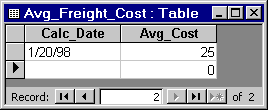
Running insert appends the data as a new record at the end of the Avg_Freight_Cost table.
If you get the following error, it is because the table is open in design mode in Access. Close the table in Access and repeat the insert function.
??? Error using ==> cursor/cursor
[Microsoft][ODBC Microsoft  7.0 Driver] Table
'Avg_Freight_Cost' is exclusively locked by user '' on machine ''
Note that the Avg_Cost value was rounded to a whole number to match the properties of that field in Access.
Always close a cursor when you are finished with it to avoid using memory unnecessarily and to ensure there are enough available cursors for other users.
close(conn)
Do not delete or change the Avg_Freight_Cost table in Access because you will use it in the next part of the tutorial.
| | Viewing Information About the Imported Data | Exporting Data from MATLAB, Replacing Existing Data in a Database | |