

| Database Toolbox | |
Exporting Multiple Records from MATLAB
In this example, multiple records are imported, manipulated in MATLAB, and then exported to a database. Specifically, you import sales figures for all products, by month, into MATLAB. Then you compute the total sales for each month. Finally, you export the monthly totals to a new table.
You use these Database Toolbox functions:
If you want to see or copy the functions for this part of the tutorial, or if you want to run the set of functions, use the M-file matlab\toolbox\database\dbdemos\dbinsert2demo.m.
dbtoolboxdemo according to the directions in Setting Up a Data Source. This data source uses the tutorial database.tutorial database to be sure it is writable, that is, not read-only.conn = database('dbtoolboxdemo', '', '');
You define the returned connection object as conn. You do not need a username or password to access the dbtoolboxdemo database.
NULL value read from the database will be converted to a 0 in MATLAB by using the setdbprefs command.setdbprefs ('NullNumberRead','0')
salesVolume table. Typecurs = exec(conn, 'select * from salesVolume'); curs = fetch(curs);
columnnames(curs)
ans =
    'Stock Number', 'January', 'February', 'March', 'April',
    'May', 'June', 'July', 'August', 'September', 'October',
    'November', 'December'
curs.Data(:,2)
m and n. In a later step, you use these values to compute the monthly totals. Type[m,n] = size(curs.Data)
for i = 2:n
    tmp = curs.Data(:,i)
    monthly(i-1,1) = sum([tmp{:}]);
end
where tmp is the sales volume for all products in a given month i, and monthly is the total sales volume of all products for the month i. To compute monthly using sum, first convert tmp from a cell array to a numeric array using [tmp{:}] because sum will only work on numeric arrays.
For example, when i is 2, row 1 of monthly is the total of all rows in column 2 of curs.Data, where column 2 is the sales volume for January.
monthly
       25100
       15621
       14606
       11944
        9965
        8643
        6525
        5899
        8632
       13170
       48345
      172000
exdata = num2cell(monthly);
num2cell takes the data in monthly and assigns each row to a row in a new cell array, exdata, which you will export in a later step.
salesTotal column of the yearlySales table; here we assign the variable colnames to the array. Typecolnames{1,1} = 'salesTotal';
yearlySales table - typeinsert(conn, 'yearlySales', colnames, exdata)
yearlySales table in the tutorial database to be sure the data was imported correctly.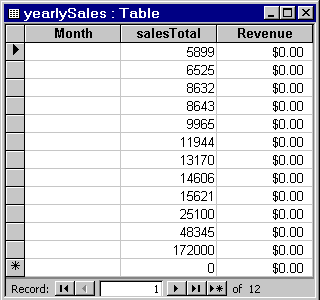
close(curs)
close(conn)
| | Exporting Data from MATLAB, Replacing Existing Data in a Database | Accessing Metadata | |