| Database Toolbox | |
Creating Queries for Results from Multiple Tables
Select multiple tables when creating a query whose results include values from both tables. This is called a join operation in SQL.
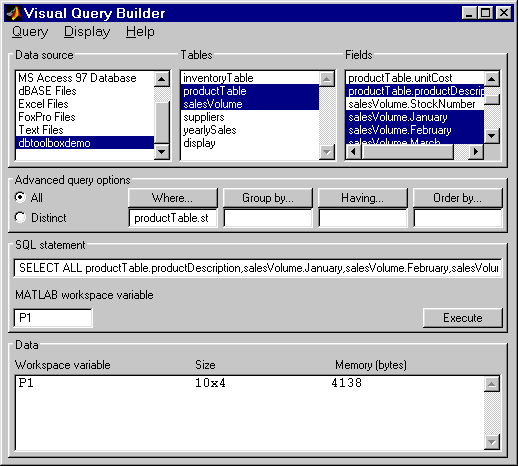
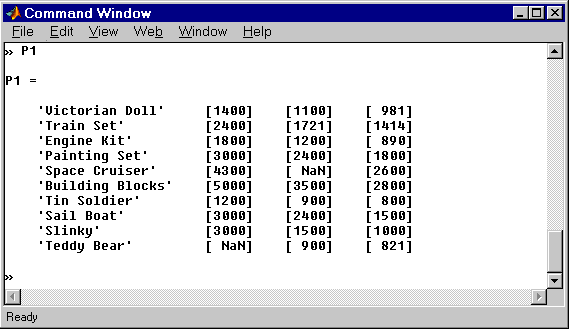
This example retrieves sales volumes by product description. The example is very similar to the example in Creating Subqueries for Values from Multiple Tables. The difference is that this example creates a query that uses both tables in order to include the product description rather than the stock number in the results.
The table salesVolume, has sales volumes and a stock number field, but not a product description field. Another table, productTable, has the product description and the stock number, but not sales volumes. Therefore, the query needs to retrieve data from both tables and equate the stock number from productTable with the stock number from the salesVolume table.
productTable and salesVolume to select both tables.The fields (columns) in those tables appear in Fields. Note that the field names now include the table names. For example, productTable.stockNumber is the field name for the stock number in the product table, and salesVolume.StockNumber is the field name for the stock number in the sales volume table.
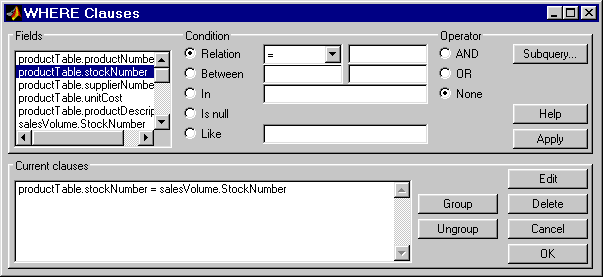
productTable.productDescription, salesVolume.January, salesVolume.February, and salesVolume.March.productTable.stockNumber with the salesVolume.StockNumber so that the product description is associated with sales volumes in the results.productTable.stockNumber from Fields.
=.
salesVolume.StockNumber.
The WHERE Clauses dialog box closes. The SQL statement in the Visual Query Builder dialog box reflects the where clause.
P1.| | Creating Subqueries for Values from Multiple Tables | Other Features in Advanced Query Options | |