| Database Toolbox | |
NULL Values
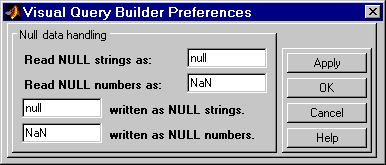
In the example results, there are two NaN values in the data, which represent NULLS. You can specify how you want the query builder to represent NULL data.
NaN to 0.A in the Command Window.Preferences apply to the current MATLAB session.
Another way to set preferences is by using the setdbprefs command. To use the same preferences whenever you run MATLAB, include the setdbprefs command in your startup file.
| | Building, Running, and Saving a Query | Using Retrieved Data in MATLAB | |