| DSP Blockset | |
Model Definition
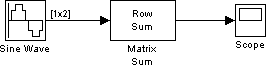
Simulink is a model definition environment. You define a model by creating a block diagram that represents the computations and data flow of your system or application. Try building a simple model that adds two sine waves and displays the result.
dspstartup at the MATLAB command line to configure Simulink for DSP simulation (optional).
One of the things that dspstartup does is set the Stop time value in the
Simulation parameters dialog box to inf for all new models. The inf
setting instructs Simulink to run the model for as long as the computer's
memory allows. You can access this dialog box and enter a different Stop
time value by selecting Simulation parameters from the model window's
Simulation menu.
 button in the MATLAB toolbar. The Library Browser appears.
 symbol next to DSP Blockset to
expand the hierarchical list of DSP libraries.
symbol next to Math Functions to expand the Math
Functions library.
symbol next to Matrices and Linear Algebra to expand the
Matrices and Linear Algebra sublibrary.
symbol next to DSP Blockset to
expand the hierarchical list of DSP libraries.
symbol next to Math Functions to expand the Math
Functions library.
symbol next to Matrices and Linear Algebra to expand the
Matrices and Linear Algebra sublibrary.
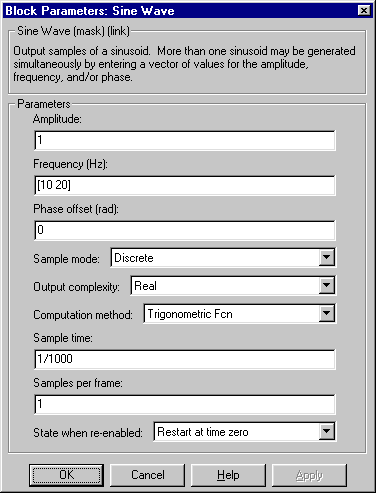
For this example, configure the block to generate a 10 Hz sine wave and a 20 Hz sine wave by entering [10 20] for the Frequency parameter. Both sinusoids will have the default amplitude of 1 and phase of 0 specified by the Amplitude and Phase offset parameters. They also both share the default sample period of 0.001 seconds specified by the Sample time parameter, which represents a sample rate of 1000 Hz.
Close the dialog box by clicking on the OK button or by pressing Enter on the keyboard.
You can now move on to the model simulation phase.
| | Getting Started with Simulink | Model Simulation | |