| Fixed-Point Blockset | |
Approximate a one-dimensional function using a selected look-up method and a dynamically specified table
Description
The FixPt Dynamic Look-Up Table block is a masked S-function that computes an approximation to some function y=f(x) given x, y data vectors. The look-up method can use interpolation, extrapolation, or the original values of the input.
The x data vector must be strictly monotonically increasing after conversion to the input's fixed-point data type. Note that due to quantization, the x data vector may be strictly monotonic in doubles format, but not so after conversion to a fixed-point data type.
You define the look-up table by inputting the x and y table data to the block as 1-by-n vectors. To help reduce the ROM used by the code generated for this block, you can use different data types for the x table data and the y table data. However, these restrictions apply:
y table data and the output vector must have the same sign, the same bias, and the same fractional slope.x table data and the x data vector must have the same sign, the same bias, and the same fractional slope. Additionally, the precision and range for the x data vector must greater than or equal to the precision and range for the x table data.The block generates output based on the input values using one of these methods selected from the Look-up method parameter list:
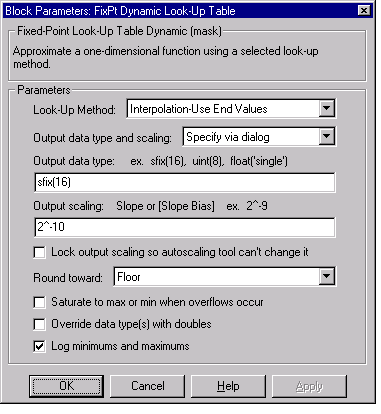
Interpolation-Extrapolation - This is the default method; it performs linear interpolation and extrapolation of the inputs.Interpolation-Use End Values - This method performs linear interpolation as described above but does not extrapolate outside the end points of the input vector. Instead, the end-point values are used.Use Input Nearest - This method does not interpolate or extrapolate. Instead, the element in x nearest the current input is found. The corresponding element in y is then used as the output.Use Input Below - This method does not interpolate or extrapolate. Instead, the element in x nearest and below the current input is found. The corresponding element in y is then used as the output. If there is no element in x below the current input, then the nearest element is found.Use Input Above - This method does not interpolate or extrapolate. Instead, the element in x nearest and above the current input is found. The corresponding element in y is then used as the output. If there is no element in x above the current input, then the nearest element is found.For a detailed description of all other block parameters, refer to Block Parameters.
Parameters and Dialog Box
Conversions
The table data is converted from doubles to the x data type. This conversion is performed offline using round-to-nearest and saturation. Refer to Parameter Conversions for more information about parameter conversions.
Example
For an example that illustrates the look-up methods supported by this block, see the example included in the FixPt Look-Up Table block reference pages.
Characteristics
| Input Port(s) |
Any data type supported by the blockset |
| Output Port |
Any data type supported by the blockset |
| Direct Feedthrough |
Yes |
| Sample Time |
Inherited |
| Scalar Expansion |
No |
| States |
0 |
| Vectorized |
Yes |
| | FixPt Dot Product | FixPt FIR | |