| Image Processing Toolbox | |
Perform neighborhood operations on binary images, using lookup tables
Syntax
A = applylut(BW,lut)
Description
A = applylut(BW,lut) performs a 2-by-2 or 3-by-3 neighborhood operation on binary image BW by using a lookup table (lut). lut is either a 16-element or 512-element vector returned by makelut. The vector consists of the output values for all possible 2-by-2 or 3-by-3 neighborhoods.
The values returned in A depend on the values in lut. For example, if lut consists of all 1's and 0's, A will be a binary image.
Class Support
BW and lut can be of class uint8 or double. If the elements of lut are all integers between 0 and 255 (regardless of the class of lut), then the class of A is uint8; otherwise, the class of A is double.
Algorithm
applylut performs a neighborhood operation on a binary image by producing a matrix of indices into lut, and then replacing the indices with the actual values in lut. The specific algorithm used depends on whether you use 2-by-2 or 3-by-3 neighborhoods.
2-by-2 Neighborhoods
For 2-by-2 neighborhoods, length(lut) is 16. There are four pixels in each neighborhood, and two possible states for each pixel, so the total number of permutations is 24 = 16.
To produce the matrix of indices, applylut convolves the binary image BW with this matrix.
8     2
4     1
The resulting convolution contains integer values in the range [0,15]. applylut uses the central part of the convolution, of the same size as BW, and adds 1 to each value to shift the range to [1,16]. It then constructs A by replacing the values in the cells of the index matrix with the values in lut that the indices point to.
3-by-3 Neighborhoods
For 3-by-3 neighborhoods, length(lut) is 512. There are nine pixels in each neighborhood, and 2 possible states for each pixel, so the total number of permutations is 29 = 512.
To produce the matrix of indices, applylut convolves the binary image BW with this matrix.
256    32     4
128    16     2
 64     8     1
The resulting convolution contains integer values in the range [0,511]. applylut uses the central part of the convolution, of the same size as BW, and adds 1 to each value to shift the range to [1,512]. It then constructs A by replacing the values in the cells of the index matrix with the values in lut that the indices point to.
Example
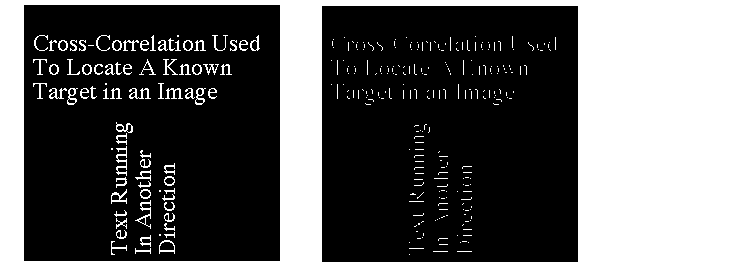
In this example, you perform erosion using a 2-by-2 neighborhood. An output pixel is on only if all four of the input pixel's neighborhood pixels are on.
lut = makelut('sum(x(:)) == 4',2);
BW1 = imread('text.tif');
BW2 = applylut(BW1,lut);
imshow(BW1)
figure, imshow(BW2)
See Also
| | Alphabetical List of Functions | bestblk | |