| Image Processing Toolbox | |
Create indexed image from intensity image, using multilevel thresholding
Syntax
X = grayslice(I,n)
X = grayslice(I,v)
Description
X = grayslice(I,n) thresholds the intensity image I using cutoff values
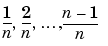 , returning an indexed image in
 X.
X = grayslice(I,v), where v is a vector of values between 0 and 1, thresholds I using the values of v, returning an indexed image in X.
You can view the thresholded image using imshow(X,map) with a colormap of appropriate length.
Class Support
The input image I can be of class uint8, uint16, or double. Note that the threshold values are always between 0 and 1, even if I is of class uint8 or uint16. In this case, each threshold value is multiplied by 255 or 65535 to determine the actual threshold to use.
The class of the output image X depends on the number of threshold values, as specified by n or length(v). If the number of threshold values is less than 256, then X is of class uint8, and the values in X range from 0 to n or length(v). If the number of threshold values is 256 or greater, X is of class double, and the values in X range from 1 to n+1 or length(v)+1.
Example
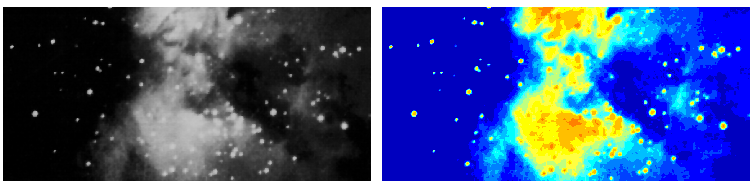
I = imread('ngc4024m.tif');
X = grayslice(I,16);
imshow(I)
figure, imshow(X,jet(16))
See Also
| | gray2ind | histeq | |