| Image Processing Toolbox | |
Display a histogram of image data
Syntax
imhist(I,n)
imhist(X,map)
[counts,x] = imhist(...)
Description
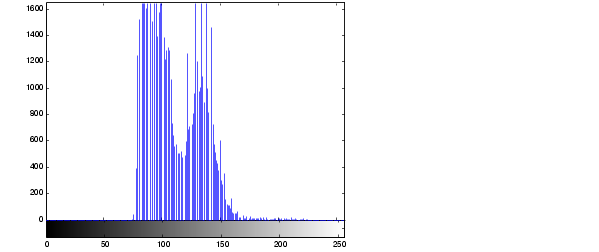
imhist(I,n) displays a histogram with n bins for the intensity image I above a grayscale colorbar of length n. If you omit the argument, imhist uses a default value of n = 256 if I is a grayscale image, or n = 2 if I is a binary image.
imhist(X,map) displays a histogram for the indexed image X. This histogram shows the distribution of pixel values above a colorbar of the colormap map. The colormap must be at least as long as the largest index in X. The histogram has one bin for each entry in the colormap.
[counts,x] = imhist(...) returns the histogram counts in counts and the bin locations in x so that stem(x,counts) shows the histogram. For indexed images, it returns the histogram counts for each colormap entry; the length of counts is the same as the length of the colormap.
Class Support
The input image can be of class uint8, uint16, or double.
Example
I = imread('pout.tif');
imhist(I)
See Also
hist in the MATLAB Function Reference
| | imfinfo | immovie | |
 . In particular, the
  th bin is the half-open
interval
th bin is the half-open
interval
 depends on the image class.
  is 1 if the intensity image is
 is 255 if the intensity image is
  is 65535 if the
intensity image is
is 65535 if the
intensity image is