| Image Processing Toolbox | |
The Discrete Fourier Transform
Working with the Fourier transform on a computer usually involves a form of the transform known as the discrete Fourier transform (DFT). There are two principal reasons for using this form:
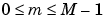
The DFT is usually defined for a discrete function  that is nonzero only over the finite region
  and
and  . The two-dimensional M-by-N DFT and inverse M-by-N DFT relationships are given by
The values  are the DFT coefficients of
  . In particular, the value
  is often called the DC coefficient. (Note that matrix indices in MATLAB always start at 1 rather than 0; therefore, the matrix elements
 f(1,1) and F(1,1) correspond to the mathematical quantities  and
and  , respectively.)
The MATLAB functions fft, fft2, and fftn implement the fast Fourier transform algorithm for computing the one-dimensional DFT, two-dimensional DFT, and N-dimensional DFT, respectively. The functions ifft, ifft2, and ifftn compute the inverse DFT.
Relationship to the Fourier Transform
The DFT coefficients  are samples of the Fourier transform
  .
.
Example
Let's construct a matrix f that is similar to the function f(m,n) in the example in Definition of Fourier Transform. Remember that f(m,n) is equal to 1 within the rectangular region and 0 elsewhere. We use a binary image to represent f(m,n).
f = zeros(30,30);
f(5:24,13:17) = 1;
imshow(f,'notruesize')
Compute and visualize the 30-by-30 DFT of f with these commands
F = fft2(f);
F2 = log(abs(F));
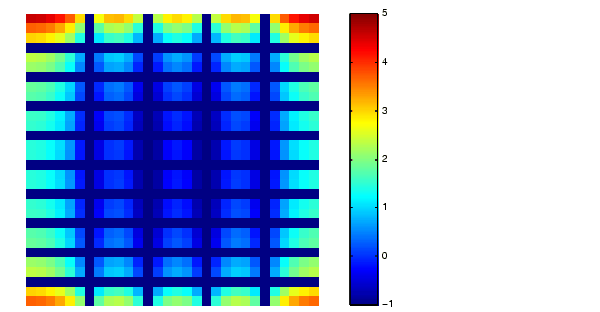
imshow(F2,[-1 5],'notruesize'); colormap(jet); colorbar
Figure 7-5: A Discrete Fourier Transform Computed Without Padding
This plot differs from the Fourier transform displayed on Figure 7-3. First, the sampling of the Fourier transform is much coarser. Second, the zero-frequency coefficient is displayed in the upper-left corner instead of the traditional location in the center.
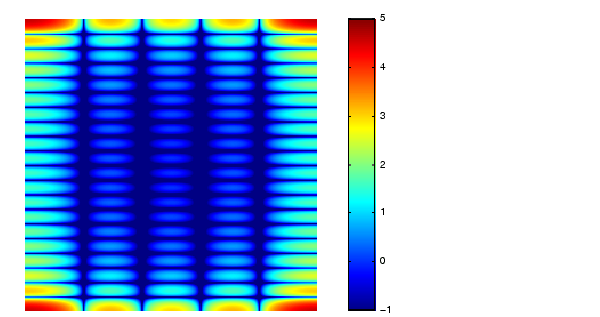
We can obtain a finer sampling of the Fourier transform by zero-padding f when computing its DFT. The zero-padding and DFT computation can be performed in a single step with this command:
F = fft2(f,256,256);
This command zero-pads f to be 256-by-256 before computing the DFT.
imshow(log(abs(F)),[-1 5]); colormap(jet); colorbar
Figure 7-6: A Discrete Fourier Transform Computed With Padding
The zero-frequency coefficient, however, is still displayed in the upper-left corner rather than the center. You can fix this problem by using the function fftshift, which swaps the quadrants of F so that the zero-frequency coefficient is in the center.
F = fft2(f,256,256);
F2 = fftshift(F);
imshow(log(abs(F2)),[-1 5]); colormap(jet); colorbar
The resulting plot is identical to the one on Figure 7-3.
| | Fourier Transform | Applications | |