| Image Processing Toolbox | |
Display an image as a texture-mapped surface
Syntax
warp(X,map)
warp(I,n)
warp(BW)
warp(RGB)
warp(z,...)
warp(x,y,z,...)
h = warp(...)
Description
warp(X,map) displays the indexed image X with colormap map as a texture map on a simple rectangular surface.
warp(I,n) displays the intensity image I with gray scale colormap of length n as a texture map on a simple rectangular surface.
warp(BW) displays the binary image BW as a texture map on a simple rectangular surface.
warp(RGB) displays the RGB image in the array RGB as a texture map on a simple rectangular surface.
warp(z,...) displays the image on the surface z.
warp(x,y,z...) displays the image on the surface (x,y,z).
h = warp(...) returns a handle to a texture mapped surface.
Class Support
The input image can be of class uint8, uint16, or double.
Remarks
Texture-mapped surfaces generally render more slowly than images.
Example
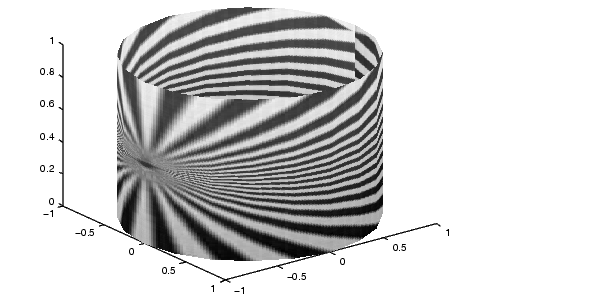
This example texture maps an image of a test pattern onto a cylinder.
[x,y,z] = cylinder;
I = imread('testpat1.tif');
warp(x,y,z,I);
See Also
image, imagesc, surf in the MATLAB Function Reference
| | uint16 | wiener2 | |