| Mapping Toolbox | |
Graphic Scale
Another element used to provide an indication of size is the graphic scale. This is a ruler-like object that shows distances on the ground at the correct size for the projection. You can use the scaleruler function to add a graphic scale to the current map. The scaleruler settings can be checked or modified using getm and setm. You can also move the graphic scale to a new position by dragging its baseline.
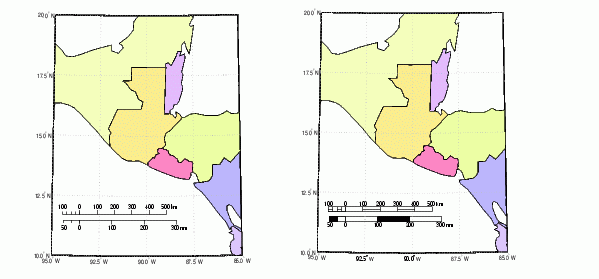
As an example, create a map, add a graphic scale with the default settings, and shift it up a bit. Add a second scale showing nautical miles, and change the tick marks and direction. Show the same map with different ruler styles.
worldmap('lo','guatamala','patchonly')

scaleruler
setm(handlem('scaleruler1'),'YLoc',.205)

scaleruler('units','nm')
setm(handlem('scaleruler2'),'MajorTick',0:100:300,...
     'MinorTick',0:25:50,'TickDir','down',...
     'MajorTickLength',km2nm(20),...
     'MinorTickLength',km2nm(12.5))

setm(handlem('scaleruler1'),'RulerStyle','lines')
setm(handlem('scaleruler2'),'RulerStyle','patches')
| | Specialized Map Functions | Choropleth Maps | |