| Real-Time Workshop User's Guide | |
Automated S-Function Generation
The Generate S-function feature automates the process of generating an S-function from a subsystem. In addition, the Generate S-function feature presents a display of parameters used within the subsystem, and lets you declare selected parameters tunable.
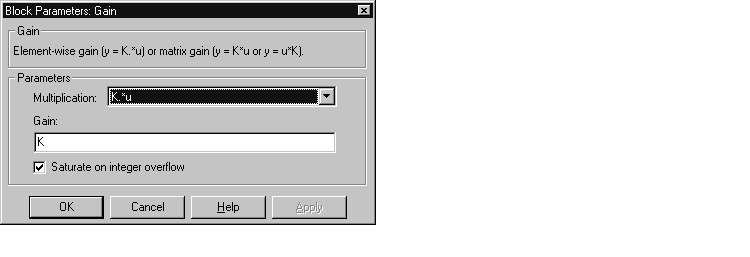
As an example, consider SourceSubsys, the subsystem illustrated in Figure 10-2. Our objective is to automatically extract SourceSubsys from the model and build an S-Function block from it, as in the previous example. In addition, we want to set the gain factor of the Gain block within SourceSubsys to the workspace variable K (as illustrated below) and declare K as a tunable parameter.
To auto-generate an S-function from SourceSubsys with tunable parameter K:
Alternatively, you can choose Generate S-function from the Real-Time Workshop submenu of the subsystem block's context menu.
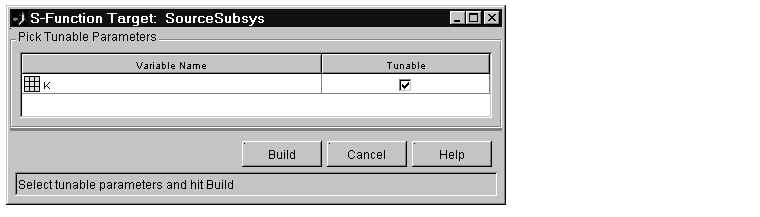
In the illustration above, the parameter K is declared tunable.
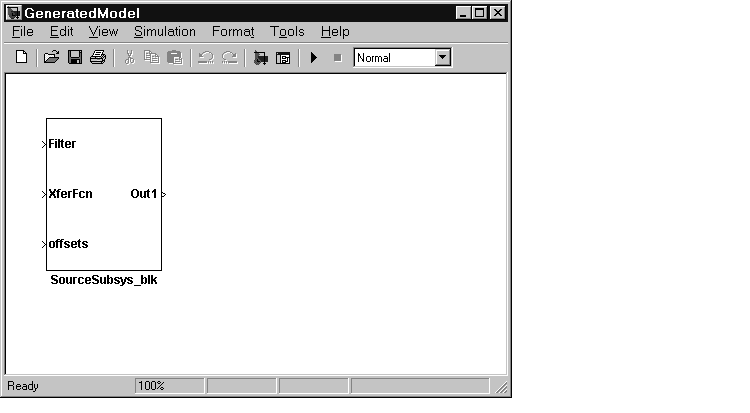
subsys_blk, where subsys is the name of the subsystem from which the block was generated.
The generated S-function component, subsys, is stored in the working
directory. The generated source code for the S-function is written to a build
directory, subsys_sfcn_rtw.
untitled generated model does not persist, unless you save it via the File menu.
The following code fragment, from the mdlOutputs routine of the generated S-function code (in SourceSubsys_sf.c), illustrates how the tunable variable K is referenced via calls to the MEX API.
static void mdlOutputs(SimStruct *S, int_T tid)
...
real_T rtb_temp3[2];
...
/* Gain Block: <S1>/Gain */
rtb_temp3[0] *= ((*(real_T *)(mxGetData(K(S)))));
rtb_temp3[1] *= ((*(real_T *)(mxGetData(K(S)))));
| Note In automatic S-function generation, the Use Value for Tunable Parameters option is always set to its default value (off). |
| | Tunable Parameters in Generated S-Functions | Restrictions | |