| Target Language Compiler | |
Inlining M-File S-Functions
All of the functionality of M-file S-functions can be inlined in the generated code. Writing a block target file for an M-file S-function is essentially identical to the process for a C MEX S-function.
Note that while you can fully inline an M-file S-function to achieve top performance - even with Simulink Accelerator - the MATLAB Math Library is not included with Real-Time Workshop, so any high-level MATLAB commands and functions you use in the M-file S-function must be written by hand in the block target file.
A quick example will illustrate the equivalence of C MEX and M-file S-functions for code generation. The M-file S-function timestwo.m is equivalent to the C MEX S-function timestwo. In fact, the TLC file for the C MEX S-function timestwo will work for the M-file S-function timestwo.m as well! Since TLC only requires the `root' name of the S-function and not its type, it is independent of the type of S-function. In the case of timestwo, one line determines what the TLC file will be used for
%implements "timestwo" "C"
To try this out for yourself, copy file timestwo.m from matlabroot/toolbox/simulink/blocks/ to a temporary directory, then copy the file timestwo.tlc from matlabroot/toolbox/simulink/blocks/tlc_c/ to the same temporary directory. In MATLAB, cd to the temporary directory and make a Simulink model with an S-function block that calls timestwo. Since the MATLAB search path will find timestwo.m in the current directory before finding the C MEX S-function timestwo in the matlabpath, Simulink will use the M-file S-function for simulation. Verify which S-function will be used by typing the MATLAB command
which timestwo
The answer you see will be the M-file S-function timestwo.m in the temporary directory. Here is the sample model.
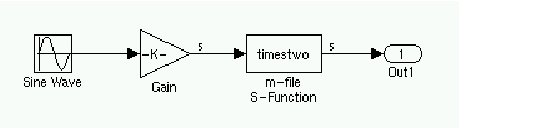
Upon generating code, you will find that the timestwo.tlc file was used to inline the M-file S-function with code that looks like this (with an input signal width of 5 in this example).
/* S-Function Block: <Root>/m-file S-Function */
  /* Multiply input by two */
  {
    int_T i1;
    const real_T *u0 = &rtB.Gain[0];
    real_T *y0 = &rtB.m_file_S_Function[0];

    for (i1=0; i1 < 5; i1++) {
      y0[i1] = u0[i1] * 2.0;
    }
  }
As expected, each of the inputs, u0[i1], is multiplied by 2.0 to form the output value. The Outputs method in the block target file used to generate this code was
%function Outputs(block, system) Output
/* %<Type> Block: %<Name> */
  %%
  /* Multiply input by two */
  %assign rollVars = ["U", "Y"]
  %roll idx = RollRegions, lcv = RollThreshold, block, "Roller", rollVars
    %<LibBlockOutputSignal(0, "", lcv, idx)> = \
    %<LibBlockInputSignal(0, "", lcv, idx)> * 2.0;
  %endroll

%endfunction
Alter these temporary copies of the M-file S-function and the TLC file to see how they interact -- start out by just changing the comments in the TLC file and see it show up in the generated code, then work up to algorithmic changes.
Inlining Fortran (FMEX) S-Functions
The capabilities of Fortran MEX S-functions can be fully inlined using a TLC block target file. With a simple F MEX S-function version of the ubiquitous "timestwo" function, this interface can be illustrated. Here is the sample Fortran S-function code
C
C     FTIMESTWO.FOR
C     $ Revision: 1.1$
C
C     A sample FORTRAN representation of a
C     timestwo S-function.
C     Copyright 1990-2000 The MathWorks, Inc.
C
C=====================================================
C     Function:  SIZES
C
C     Abstract:
C       Set the size vector.
C
C       SIZES returns a vector which determines model
C       characteristics.  This vector contains the
C       sizes of the state vector and other
C       parameters. More precisely,
C       SIZE(1)  number of continuous states
C       SIZE(2)  number of discrete states
C       SIZE(3)  number of outputs
C       SIZE(4)  number of inputs
C       SIZE(5)  number of discontinuous roots in
C                the system
C       SIZE(6)  set to 1 if the system has direct
C                feedthrough of its inputs,
C                otherwise 0
C
C=====================================================
C
      SUBROUTINE SIZES(SIZE)
C     .. Array arguments ..
      INTEGER*4        SIZE(*)
C     .. Parameters ..
      INTEGER*4       NSIZES
      PARAMETER       (NSIZES=6)

      SIZE(1) = 0
      SIZE(2) = 0
      SIZE(3) = 1
      SIZE(4) = 1
      SIZE(5) = 0
      SIZE(6) = 1

      RETURN
      END

C
C=====================================================
C
C     Function:  OUTPUT
C
C     Abstract:
C       Perform output calculations for continuous
C       signals.
C
C=====================================================
C     .. Parameters ..
      SUBROUTINE OUTPUT(T, X, U, Y)
      REAL*8           T
      REAL*8           X(*), U(*), Y(*)

      Y(1) = U(1) * 2.0

      RETURN
      END

C
C=====================================================
C
C     Stubs for unused functions.
C
C=====================================================

      SUBROUTINE INITCOND(X0)
      REAL*8           X0(*)
C --- Nothing to do.
      RETURN
      END

      SUBROUTINE DERIVS(T, X, U, DX)
      REAL*8           T, X(*), U(*), DX(*)
C --- Nothing to do.
      RETURN
      END

      SUBROUTINE DSTATES(T, X, U, XNEW)
      REAL*8           T, X(*), U(*), XNEW(*)
C --- Nothing to do.
      RETURN
      END

      SUBROUTINE DOUTPUT(T, X, U, Y)
      REAL*8           T, X(*), U(*), Y(*)
C --- Nothing to do.
      RETURN
      END

      SUBROUTINE TSAMPL(T, X, U, TS, OFFSET)
      REAL*8           T,TS,OFFSET,X(*),U(*)
C --- Nothing to do.
      RETURN
      END

      SUBROUTINE SINGUL(T, X, U, SING)
      REAL*8           T, X(*), U(*), SING(*)
C --- Nothing to do.
      RETURN
      END
Copy the above code into file ftimestwo.for in a convenient working directory.
Putting this into an S-function block in a simple model will illustrate the interface for inlining the S-function. Once your Fortran MEX environment is set up, prepare the code for use by compiling the S-function in a working directory along with the file simulink.for from matlabroot/simulink/src/. This is done with the mex command at the MATLAB command prompt.
mex -fortran ftimestwo.for simulink.for
And now reference this block from a simple Simulink model set with a fixed step solver and the grt target.
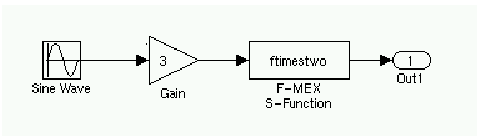
The TLC code needed to inline this block is a modified form of the now familiar timestwo.tlc. In your working directory, create a file named ftimestwo.tlc and put this code into it.
%implements "ftimestwo" "C"

%function Outputs(block, system) Output
  /* %<Type> Block: %<Name> */
  %%
  /* Multiply input by two */
  %assign rollVars = ["U", "Y"]
  %roll idx = RollRegions, lcv = RollThreshold, block, ...
"Roller", rollVars
    %<LibBlockOutputSignal(0, "", lcv, idx)> = \
    %<LibBlockInputSignal(0, "", lcv, idx)> * 2.0;
  %endroll
%endfunction
Now you can generate code for the ftimestwo Fortran MEX S-function. The resulting code fragment specific to ftimestwo is
/* S-Function Block: <Root>/F-MEX S-Function */
  /* Multiply input by two */
  rtB.F_MEX_S_Function = rtB.Gain * 2.0;
Inlining Ada-MEX S-Functions
Like all the other S-functions, Ada MEX S-functions directly support inlining in the generated code. As an example, copy the times_two Ada MEX S-function source code from directory matlabroot/simulink/ada/examples/times_two/ to a temporary directory -- make sure to get both the times_two.adb and times_two.ads files. Once your Ada MEX environment is set up, compile times_two from the MATLAB command line with
mex -ada times_two.adb
which makes a MEX file named ada_times_two.mexext. Use this MEX S-function in a model the same way as other S-functions.
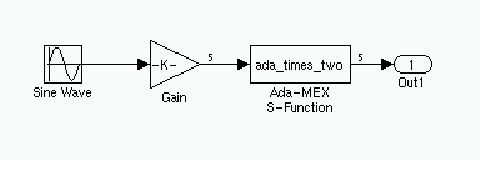
To inline this function in C code, copy the timestwo.tlc file from the previous M-file S-function example into the temporary directory and name it ada_times_two.tlc. In the editor, modify the %implements line to match the name of the S-function, in this case it should read
%implements "ada_times_two" "C"
After ensuring your model is set to use a fixed-step solver, generate C code for this model. The Ada Mex S-function code looks the same as it does for all the other S-function implementations
/* S-Function Block: <Root>/Ada-MEX S-Function */
  /* Multiply input by two */
  {
    int_T i1;
    const real_T *u0 = &rtb_temp1[0];
    real_T *y0 = &rtb_temp1[0];

    for (i1=0; i1 < 5; i1++) {
      y0[i1] = u0[i1] * 2.0;
    }
  }
If, as is likely, you wish to generate inlined Ada code for your model and its Ada MEX S-function using the Real-Time Workshop Ada Coder, you use a different TLC file -- one that generates Ada code. To get started with this, copy the timestwo.tlc file from matlabroot/toolbox/simulink/blocks/tlc_ada/ into the temporary directory and name it ada_times_two.tlc. Once again, edit the %implements line to read
%implements "ada_times_two" "Ada"
So the minimum necessary contents of the TLC file look like this.
%implements "ada_times_two" "Ada"

%function Outputs(block, system) Output
  -- %<Type> Block: %<Name>
  %%
  -- Multiply input by two
  %assign rollVars = ["U", "Y"]
  %roll idx = RollRegions, lcv = RollThreshold, block, "Roller", rollVars
    %<LibBlockOutputSignal(0, "", lcv, idx)> := \
    %<LibBlockInputSignal(0, "", lcv, idx)> * 2.0;
  %endroll

%endfunction
Now select Ada Simulation Target for GNAT via the Tools -> Real-Time Workshop -> Options... menu using the Select... button. This target uses the rt_ada_sim.tlc system target file and does not support blocks with continuous states, so it will be necessary to alter the sine wave source block to have a discrete sample time (choose it to be the same as the value chosen for the fixed-step solver's time step, for instance).
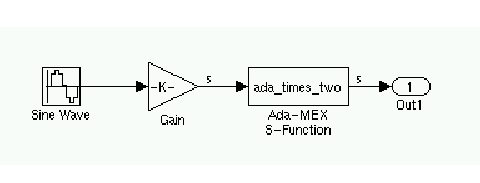
Generate code with the Build button. The model.ads file that is generated will contain this inlined code for the ada_times_two S-function.
-- S-Function Block: <Root>/Ada-MEX S-Function
      -- Multiply input by two
      for I1 in 0 .. 4 loop
         RT_B_Temp1(I1) := RT_B_Temp1(I1) * 2.0;
      end loop;
Notice that the TLC code is relatively independent of the target language in use (C or Ada) -- for instance, the %roll construct will create the correct C or Ada loop code based solely on whether the block target file implements "C" or "Ada". TLC constructs themselves are meant to be language-neutral; the only part that is language-specific are the operators, comments, and function name differences in the standard libraries.
TLC Coding Conventions
These guidelines help ensure that the programming style in each target file is consistent, and hence, more easily modifiable.
Begin Identifiers with Uppercase Letters
All identifiers in the Real-Time Workshop file begin with an uppercase letter. For example,
NumModelInputs            1
NumModelOutputs           2
NumNonVirtBlocksInModel  42
DirectFeedthrough         yes
NumContStates             10
Block records that contain a Name identifier should start the name with an uppercase letter since the Name identifier is often promoted into the parent scope. For example, a block may contain
Block {
   :
   :
RWork            [4, 0]
   :
NumRWorkDefines   4
RWorkDefine {
    Name         "TimeStampA"
    Width         1
    StartIndex    0
  }
}
Since the Name identifier within the RWorkDefine record is promoted to PrevT in its parent scope, it must start with an uppercase letter. The promotion of the Name identifier into the parent block scope is currently done for the Parameter, RWorkDefine, IWorkDefine, and PWorkDefine block records.
The Target Language Compiler assignment directive (%assign) generates a warning if you assign a value to an "unqualified" Real-Time Workshop identifier. For example,
%assign TID = 1
produces an error because TID identifier is not qualified by Block. However, a "qualified" assignment does not generate a warning.
%assign Block.TID = 1
does not generate a warning because the Target Language Compiler assumes the programmer is intentionally modifying an identifier since the assignment contains a qualifier.
Begin Global Variable Assignments with Uppercase Letters
Global TLC variable assignments should start with uppercase letters. A global variable is any variable declared in a system target file (grt.tlc, mdlwide.tlc, mdlhdr.tlc, mdlbody.tlc, mdlreg.tlc, or mdlparam.tlc), or within a function that uses the :: operator. In some sense, global assignments have the same scope as Real-Time Workshop variables. An example of a global TLC variable defined in mdlwide.tlc is
%assign InlineParameters = 1
An example of a global reference in a function is
%function foo() void
  %assign ::GlobalIdx = ::GlobalIdx + 1
%endfunction
Begin Local Variable Assignments with Lowercase Letters
Local TLC variable assignments should start with lowercase letters. A local TLC variable is a variable assigned inside a function. For example,
%assign numBlockStates = ContStates[0]
Begin Functions Declared in block.tlc files with Fcn
When you declare a function inside a block.tlc file, it should start with Fcn. For example,
%function FcnMyBlockFunc(...)
| Note Functions declared inside a system file are global; functions declared inside a block file are local. |
Do Not Hard Code Variables Defined in commonsetup.tlc
Since the Real-Time Workshop tracks use of variables and generates code based on usage, you should use access routines instead of directly using a variable. For example, you should not use the following in your TLC file.
x = %<tInf>;
x = %<LibRealNonFinite(inf)>;
Similarly, instead of using %<tTID>, use %<LibTID()>. For a complete list of functions, see Chapter 9, TLC Function Library Reference.
All Real-Time Workshop global variables start with rt and all Real-Time Workshop global functions start with rt_.
Avoid naming global variables in your run-time interface modules that start with rt or rt_ since they may conflict with Real-Time Workshop global variables and functions. These TLC variables are declared in commonsetup.tlc.
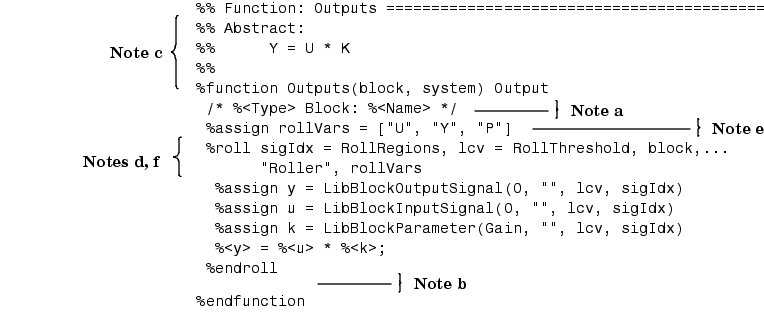
This convention creates consistent variables throughout the target files. For example, the Gain block contains the following Outputs function.
constant.tlc.
sysIdx and blkIdx for system index
and block index, respectively.
rollVars when using the %roll construct.
sigIdx and lcv when looping
over RollRegions and xidx and xlcv when looping over the states.
Example: Output function in gain.tlc
%roll sigIdx = RollRegions, lcv = RollThreshold, ...
       block, "Roller", rollVars
Example: InitializeConditions function in linblock.tlc
%roll xidx = [0:nStates-1], xlcv = RollThreshold,...
       block, "Roller", rollVars
Conditional Inclusion in Library Files
The Target Language Compiler function library files are conditionally included via guard code so that they may be referenced via %include multiple times without worrying if they have previously been included. It is recommended that you follow this same practice for any TLC library files that you yourself create.
The convention is to use a variable with the same name as the base filename, uppercased and with underscores attached at both ends. So, a file named customlib.tlc should have the variable _CUSTOMLIB_ guarding it.
As an example, the main Target Language Compiler function library, funclib.tlc, contains this TLC code to prevent multiple inclusion.
%if EXISTS("_FUNCLIB_") == 0
%assign _FUNCLIB_ = 1
  .
  .
  .
%endif  %% _FUNCLIB_
| | A Complete Example | Block Target File Methods | |