| Signal Processing Toolbox | |
Magnitude and Phase
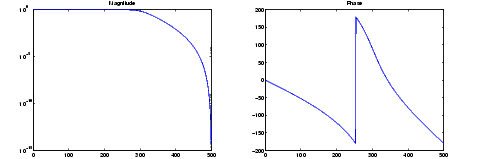
MATLAB provides functions to extract magnitude and phase from a frequency response vector h. The function abs returns the magnitude of the response; angle returns the phase angle in radians. To extract and plot the magnitude and phase of a Butterworth filter.
[b,a] = butter(6,300/500);
[h,w] = freqz(b,a,512,1000);
m = abs(h); p = angle(h);
semilogy(w,m); title('Magnitude');
figure; plot(w,p*180/pi); title('Phase');
The unwrap function is also useful in frequency analysis. unwrap unwraps the phase to make it continuous across 360º phase discontinuities by adding multiples of ±360°, as needed. To see how unwrap is useful, design a 25th-order lowpass FIR filter.
h = fir1(25,0.4);
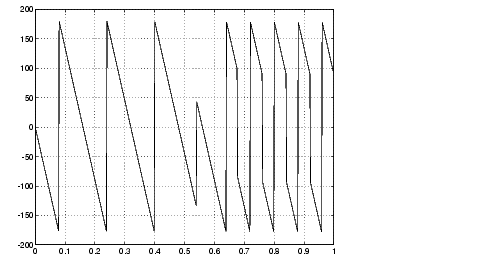
Obtain the filter's frequency response with freqz, and plot the phase in degrees.
[H,f] = freqz(h,1,512,2);
plot(f,angle(H)*180/pi); grid
It is difficult to distinguish the 360° jumps (an artifact of the arctangent function inside angle) from the 180° jumps that signify zeros in the frequency response.
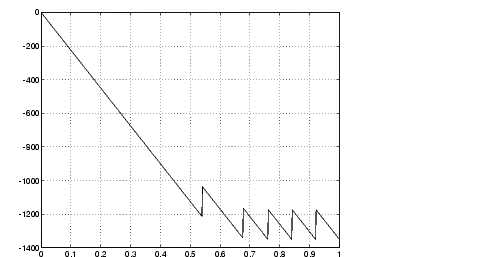
Use unwrap to eliminate the 360° jumps.
plot(f,unwrap(angle(H))*180/pi); grid
| | Analog Domain | Delay | |