| Using Simulink | |
Apply a specified expression to the input.
Library
Description
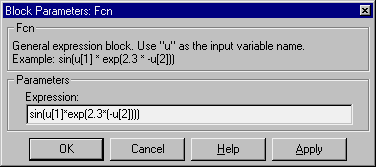
The Fcn block applies the specified C language style expression to its input. The expression can be made up of one or more of these components:
u -- the input to the block. If u is a vector, u(i) represents the ith element of the vector; u(1) or u alone represents the first element.* /)== != > < >= <=) -- The expression returns 1 if the relation is TRUE; otherwise, it returns 0.abs, acos, asin, atan, atan2, ceil, cos, cosh, exp, fabs, floor, hypot, ln, log, log10, pow, power, rem, sgn, sin, sinh, sqrt, tan, and tanh.A(1,1) instead of A for the first element in the matrix).The rules of precedence obey the C language standards:
The expression differs from a MATLAB expression in that the expression cannot perform matrix computations. Also, this block does not support the colon operator (:).
Block input can be a scalar or vector. The output is always a scalar. For vector output, consider using the Math Function block. If a block is a vector and the function operates on input elements individually (for example, the sin function), the block operates on only the first vector element.
Data Type Support
A Fcn block accepts and outputs signals of type double.
Parameters and Dialog Box
Characteristics
| Direct Feedthrough |
Yes |
| Sample Time |
Inherited from driving block |
| Scalar Expansion |
No |
| Dimensionalized |
No |
| Zero Crossing |
No |
| | Enable | First-Order Hold | |