| Statistics Toolbox | |
Plot error bars along a curve.
Syntax
errorbar(X,Y,L,U,symbol)
errorbar(X,Y,L)
errorbar(Y,L)
Description
errorbar(X,Y,L,U,symbol)
plots X versus Y with error bars specified by L and U. X, Y, L, and U must be the same length. If X, Y, L, and U are matrices, then each column produces a separate line. The error bars are each drawn a distance of U(i) above and L(i) below the points in (X,Y). symbol is a string that controls the line type, plotting symbol, and color of the error bars.
errorbar(X,Y,L)
plots X versus Y with symmetric error bars about Y.
errorbar(Y,L)
plots Y with error bars [Y-L Y+L].
The errorbar function is a part of the standard MATLAB language.
Example
lambda = (0.1:0.2:0.5);
r = poissrnd(lambda(ones(50,1),:));
[p,pci] = poissfit(r,0.001);
L = p - pci(1,:)
U = pci(2,:) - p
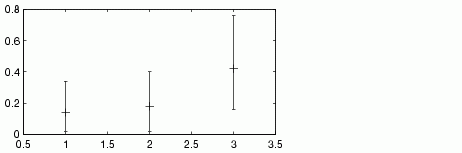
errorbar(1:3,p,L,U,'+')
L =
    0.1200    0.1600    0.2600
U =
    0.2000    0.2200    0.3400
| | dummyvar | ewmaplot | |