

| Symbolic Math Toolbox | |
Syntax
funtool
Description
funtool is a visual function calculator that manipulates and displays functions of one variable. At the click of a button, for example, funtool draws a graph representing the sum, product, difference, or ratio of two functions that you specify. funtool includes a function memory that allows you to store functions for later retrieval.
funtool displays graphs of a pair of functions, f(x) = x andg(x) = 1. The graphs plot the functions over the domain [-2*pi, 2*pi]. funtool also displays a control panel that lets you save, retrieve, redefine, combine, and transform f and g.
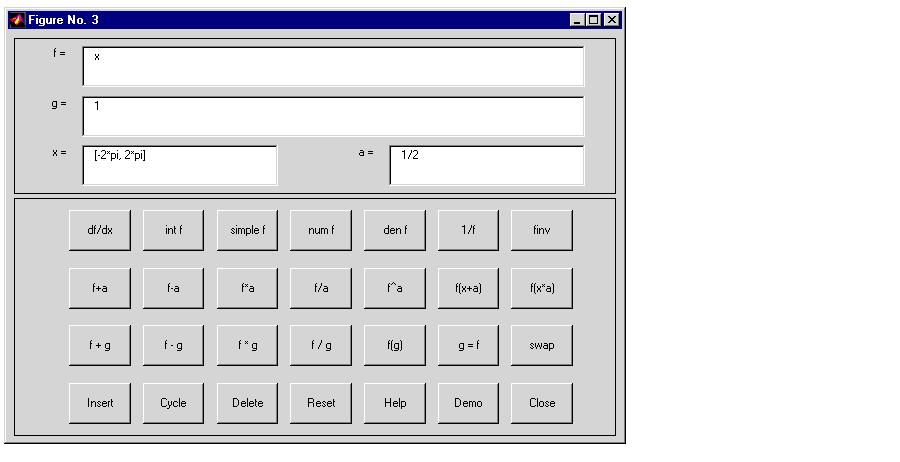
Text Fields. The top of the control panel contains a group of editable text fields.
f. Edit this field to redefine f.g. Edit this field to redefine g.f and g. Edit this field to specify a different domain.f (see button descriptions in the next section). Edit this field to change the value of the constant factor.funtool redraws f and g to reflect any changes you make to the contents of the control panel's text fields.
Control Buttons.
The bottom part of the control panel contains an array of buttons that transform f and perform other operations.
f with various transformations of f.
fff, if possiblefffff and the domain of f by a constant factor. To specify the factor, enter its value in the field labeled a= on the calculator control panel. The operations are
f(x) by f(x) + a.f(x) by f(x) - a.f(x) by f(x) * a.f(x) by f(x) / a.f(x) by f(x) ^ a.f(x) by f(x + a ).f(x) by f(x * a).f with a combination of f and g.
f(x) by f(x) + g(x).f(x) by f(x)-g(x).f(x) by f(x) * g(x).f(x) by f(x) / g(x).f and g.
g with f.f with g and g with f.f to the end of the list of stored functions.f with the next item on the function list.f from the list of stored functions.| | fourier | horner | |