| Database Toolbox |
  |
Retrieving Unique Occurrences
In the Visual Query Builder Advanced query options, select Distinct to limit results to only unique occurrences. Select All to retrieve all occurrences. For example:
- Select the Data source; for example,
dbtoolboxdemo.
- Select the Tables; for example,
SalesVolume.
- Select the Fields; for example,
January.
- Run the query to retrieve all occurrences.
- In Advanced query options, select All.
- Assign a MATLAB workspace variable; for example,
All.
- Click Execute.
- Run the query to retrieve only unique occurrences.
- In Advanced query options, select Distinct.
- Assign a MATLAB workspace variable, for example,
Distinct.
- Click Execute.
- In the Data area, the Workspace variable size shows
10x1 for All and 8x1 for Distinct.
- In the Command Window, type
All, Distinct to display the query results.
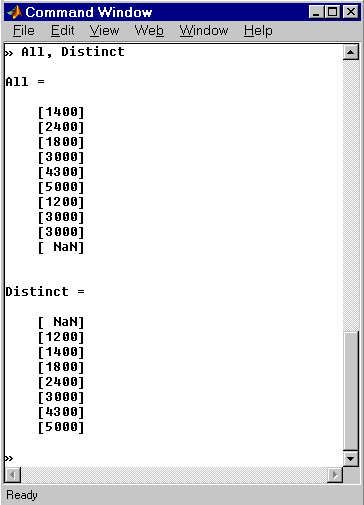
The value 3000, appears three times in All, but appears only once in Distinct.
| | Fine-Tuning Queries Using Advanced Query Options | | Retrieving Information That Meets Specified Criteria | |